


Collect - Settlement Finder
4.7302.00 Reviews
App Specs
- Version
- 2.7.4
- Updated On
- License
- Free
- Downloads
- 100,000+
- Developer
- Ferrix Labs
- Categories
- Finance
- Platform
- Android
Screenshots

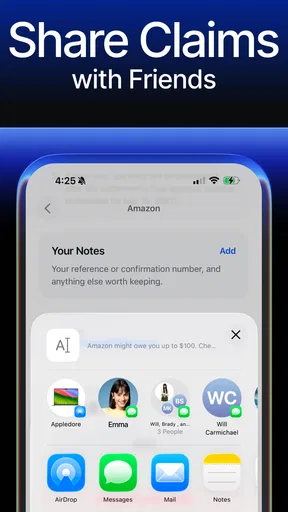
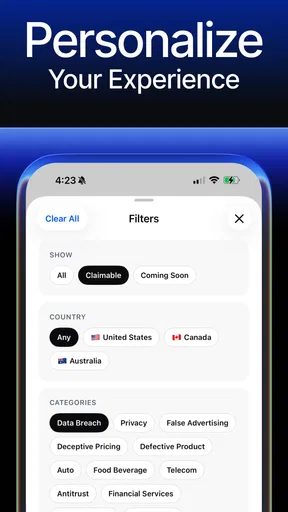
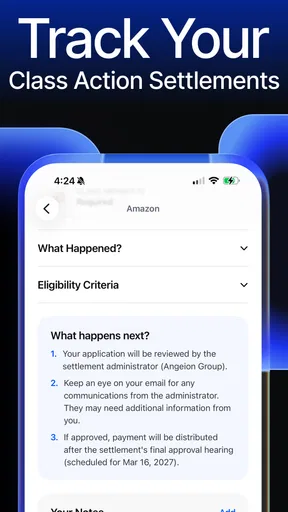
 Analysis by AppCompare
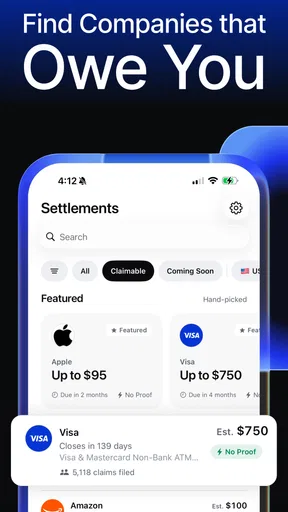
Collect - Settlement Finder takes a very specific approach to personal finance: it helps people look for class action settlement money they may be entitled to claim. I found the idea appealing because it focuses on an overlooked source of money rather than asking me to build a budget, track investments, or connect a bank account. The main promise is simple, but the usefulness depends on how much effort I am willing to put into checking eligibility and completing each claim carefully.
As a free finance app from Ferrix Labs, it is aimed at ordinary users who want to search for possible settlement claims without spending hours browsing legal notices. Its age rating is Everyone, so the concept is accessible to a broad audience. The app has reached over 100 thousand installs and holds a 4.7 average from around 8.6 thousand ratings, which suggests that many people find the basic idea worthwhile. I would still treat those figures as a reason to investigate the app, not as proof that every claim will lead to a payment.
How Collect fits into a real financial routine
My first impression is that Collect - Settlement Finder is best understood as a discovery and filing tool, not a guaranteed-income service. It can help surface opportunities, but eligibility remains personal. A settlement may require a purchase during a particular period, proof of ownership, an account history, or a truthful description of what happened. The app cannot turn an ineligible person into an eligible claimant, and no settlement search should be treated like an investment plan.
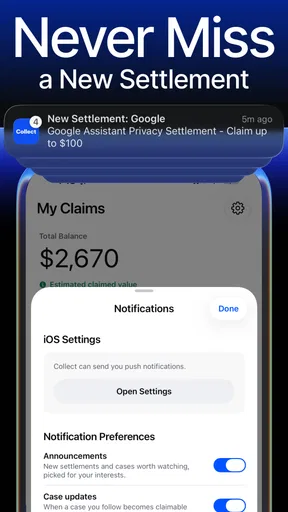
A realistic use case would be someone who receives a notification, opens the app during a lunch break, and reviews several available claims. Instead of immediately submitting everything, I would first read the eligibility wording, note any deadlines, and check whether the requested information is actually available. That small pause matters. A fast filing process is useful only when the claim is accurate and supported by the details requested.
The app’s short store label is “Collect,” while its longer description centers on finding and filing class action claims in minutes. That positioning makes it more focused than a typical personal finance app. It is not trying to replace a spreadsheet, a banking app, or a tax tool. Its value comes from reducing the search burden around settlements that many people would otherwise never hear about.
What feels quick, and what still takes time
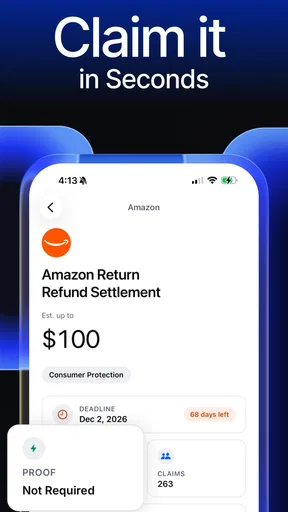
The workflow is designed around short interactions: discover a possible settlement, open its details, decide whether it applies, and submit the required information. That should make the app feel lighter than researching notices across unrelated websites. In my experience with this kind of task, the real time saving comes from having potential opportunities gathered in one place rather than from the final form itself.
There is an important distinction between app speed and claim speed. A screen can open quickly while the settlement process still takes weeks or longer outside the app. Collect can help with the initial search and filing, but it does not make a court-approved distribution happen instantly. I would not download it expecting immediate cash after tapping a button.
Worth Reading Before You Choose

EA SPORTS FC Mobile 26 Is a Bigger Football Game, but It Takes Time

Flipboard Shows What News Apps Must Do Beyond the Feed

Switching to Android Auto Means Rethinking Your Driving Routine

Google Calendar Makes a Crowded Week Easier to Manage

Ludo King Makes the Most of the Minutes Between Plans

Baby Panda World Brings Quick Play to Modern Phones, but Its Game Library Feels Busy
The most efficient personal workflow is to keep a small record of claims I have reviewed. I would note the settlement name, why I appear eligible, what evidence is required, and whether I submitted anything. This avoids duplicate work and reduces the chance of making contradictory claims later. It also makes the app more useful for people who check periodically rather than treating it as a one-time search.
A less obvious advantage is that the app can act as a reminder to investigate purchases and services I have forgotten. People often remember the product but not the exact dates, receipts, or account details. When that happens, the app may still be useful as a prompt, but I would never guess information simply to complete a form. Accuracy is more important than finishing quickly.
Heavy-use moments and the cost of attention
Collect is unlikely to be demanding in the same way as a game, video editor, or navigation app. Its central task is reading settlement information and entering answers, so the heavier burden is usually attention rather than processing power. A user may move through several listings, compare eligibility conditions, and return to an earlier claim with documents or account information ready.
That makes the app more comfortable in short sessions than in a long, uninterrupted sweep. When I am tired, legal wording is easy to skim incorrectly. I would rather review a few claims carefully than rush through a large batch. The app’s promise of filing in minutes should be read as a convenience for straightforward claims, not a recommendation to ignore the details.
One practical trade-off is that the easiest claims may also be the least valuable or the most limited by eligibility. More involved claims can require better records and more patience. Collect may reduce the search friction, but it cannot remove the user’s responsibility to understand what is being signed. This is where it differs from a coupon app: the form is connected to a legal settlement, so careless entries can create avoidable problems.
For heavy use, I would prepare before opening the app. Have relevant email accounts, purchase records, service dates, and any permitted proof nearby. Do not assume that screenshots or receipts will always be needed, but be ready to check the instructions. This preparation makes the process feel faster and reduces repeated switching between apps.
Reliability means more than a smooth screen
The current version is 2.7.4, and that gives me the impression that Ferrix Labs has continued refining the product rather than leaving it as a simple one-release experiment. Still, a version number alone cannot guarantee that every listing is current or that every claim will be accepted. Settlement opportunities change, deadlines pass, and administrators make the final decisions.
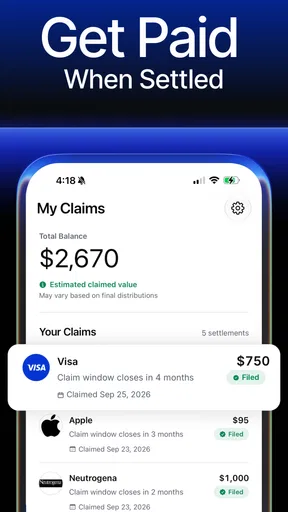
I would judge reliability in three layers. First, does the app present a claim clearly enough for me to understand why it might apply? Second, does the filing flow preserve the information I enter without forcing unnecessary repetition? Third, can I keep track of what I submitted afterward? The first two affect convenience; the third affects confidence. A discovery tool becomes much more useful when it helps users avoid losing track of their own submissions.
Users should also separate app reliability from payment reliability. Even if Collect works perfectly, payment timing and approval depend on the settlement process. A submitted claim is not the same thing as an approved claim, and an approved claim is not necessarily an immediate payment. That distinction is essential for anyone managing bills or counting on the money.
My biggest reliability concern is not whether the app opens; it is whether I can make a well-informed decision from the information shown. I would look for clear eligibility language, a visible deadline, and a straightforward explanation of what information is requested. If a listing feels vague, I would pause and verify the details through the official settlement materials before submitting.
Privacy also deserves practical attention. Finance-related apps can involve sensitive personal details even when they do not connect directly to a bank. I would read each form before entering information and provide only what the claim requires. I would not upload unrelated documents, share account credentials, or assume that a request is necessary merely because it appears in a convenient workflow.
Device limits, operating system support, and value
The minimum operating system is version 9, so compatibility should cover many older devices while excluding phones that have not been updated in a long time. That is helpful for an app whose main purpose is occasional checking; users should not need a recent flagship phone just to review settlement opportunities. Performance expectations should still be realistic on older hardware, especially when switching between the app, email, cloud storage, and document viewers.
Because the app is free to install, the initial barrier is low. However, in-app purchases range from $12.99 to $34.99 per item. That changes the value calculation. I would begin with the free experience and understand exactly what a paid item provides before spending money. A paid convenience may be reasonable for someone who values saved time, but it should not be confused with a higher chance of being eligible or receiving a settlement payment.
This is one of the clearest situations where another option may be better. If I am comfortable searching public settlement notices myself, keeping a spreadsheet, and completing forms manually, I may not need to pay for extra convenience. On the other hand, someone who repeatedly misses notices because they do not know where to look may find the app worthwhile even if the financial return from any individual claim is uncertain.
I would also skip it if I want a complete money-management system. Collect does not occupy the same role as a budgeting app that categorizes spending, a banking app that shows balances, or an investment platform. Its narrow focus is its strength, but it also means that users looking for broader financial control will need another tool alongside it.
Small habits that make the app safer and more useful
My first tip is to separate “possibly eligible” from “ready to file.” Finding a matching product or service is only the first step. Before submitting, I would check the relevant dates, location requirements, purchase conditions, and proof rules shown for that claim. This prevents the common mistake of treating a familiar brand name as automatic eligibility.
My second tip is to use a personal claim log. Record the date reviewed, the reason for eligibility, the information submitted, and any confirmation received. This is especially helpful when several claims ask similar questions. It also gives me a reference if I later receive an email or need to distinguish one settlement from another.
My third tip is to avoid submitting duplicate claims through multiple channels. If I discover a settlement in Collect and later see the same opportunity elsewhere, I would choose one legitimate filing route and keep the confirmation. Repeating a claim can create confusion and does not improve the outcome.
My fourth tip is to treat payment estimates cautiously. A settlement may divide available funds among approved claimants, and the final amount can depend on the claim rules and the number of valid submissions. I would use the app to identify opportunities, not to forecast monthly income or justify a purchase.
Finally, I would review the app in batches rather than opening it every few minutes. A scheduled check gives me a calmer process: read new listings, discard those that clearly do not apply, prepare evidence for promising ones, and update my claim log. This approach makes the app less distracting and turns it into a manageable financial errand.
Who will appreciate it, and who should pass
Collect is a good fit for people who have heard about class action settlements but rarely know where to find them. It is also useful for users who want a focused tool instead of searching through legal announcements, news articles, and scattered claim pages. The free entry point makes it easy to test whether the app’s approach suits your habits before considering any optional purchase.
I would recommend caution for anyone who dislikes reading eligibility conditions or keeping records. The app may make discovery easier, but it cannot replace judgment. Users who expect every listing to produce money, every claim to be approved, or every payment to arrive quickly are likely to be disappointed.
It is also not the best choice for people who are uncomfortable entering personal information into a finance-related service. In that case, researching settlements independently and filing through the official administrator may feel more appropriate. The extra effort can be worthwhile when control over the process matters more than convenience.
For accessibility, the Everyone rating makes the concept broadly approachable, but that does not mean every settlement is suitable for every person. Eligibility is determined by each claim’s rules, not by the app’s general audience rating. Parents, older users, and people helping relatives should still review every form together when the details are confusing.
My performance verdict after weighing convenience against control
Collect - Settlement Finder is most convincing as a focused discovery layer for money that many people overlook. It should feel lighter than broad finance software because it does one job: bringing potential settlement claims to the user and helping with the filing process. Its likely performance advantage is convenience and reduced searching, not advanced financial analysis or intensive device optimization.
The app’s limitations are equally clear. It cannot guarantee eligibility, approval, or payment. It cannot make complicated settlement rules disappear. Optional purchases also mean that “free” should be understood as a low-risk starting point rather than a promise that every useful action will remain free.
After using it, I would keep it if I wanted a recurring reminder to check possible claims and was willing to verify each one carefully. I would skip it if I already had a reliable manual system or wanted a full budgeting and banking companion. My recommendation is to treat Collect as a careful search assistant, not a shortcut to guaranteed cash.
Ferrix Labs has built an app with a narrow purpose, and that focus is its strongest quality. The experience makes sense for occasional reviews, prepared filing sessions, and users who would otherwise miss settlement notices entirely. Used patiently, it can save search time and organize an otherwise scattered task. Used carelessly, it may encourage rushed submissions or unrealistic expectations. That balance is the key to deciding whether it belongs on your phone.
Pros
- Quickly locates nearby settlements using map-based exploration.
- Useful filters help narrow results by type
- size
- or location.
- Offline-friendly planning can help in areas with limited signal.
- Clean interface makes browsing settlement information straightforward.
- Helpful for travelers
- researchers
- and geography enthusiasts.
Cons
- Coverage and accuracy may vary between regions.
- Some remote settlements may have limited or missing details.
- Map features can consume considerable battery during extended use.
- The app’s usefulness depends heavily on available map data.
- Advanced information may require an internet connection.
FAQs for Collect - Settlement Finder
What is Collect - Settlement Finder, and how does it work?
Collect - Settlement Finder is an app designed to help users discover and review potential legal settlement opportunities. It typically presents information about class actions or consumer settlements, including eligibility requirements, deadlines, estimated benefits, and claim instructions. After installing it, users should read each settlement’s official details carefully because the app provides guidance, but eligibility and payment decisions are ultimately handled by the settlement administrator or court.
Is Collect - Settlement Finder free to download and use?
The app is generally intended to be accessible without an upfront download fee, allowing users to browse available settlement information and learn about possible claims. However, users should check the current Google Play Store or Apple App Store listing for the latest pricing and in-app purchase details. Be cautious of any service requesting payment to submit a claim, since many legitimate settlement claims can be filed without paying a fee.
Can Collect - Settlement Finder guarantee that I will receive settlement money?
No application can guarantee that a user will receive compensation from a settlement. Collect - Settlement Finder may help identify opportunities and explain how to apply, but you still need to meet the settlement’s eligibility rules, submit accurate information, and meet the filing deadline. Payments can also depend on the number of approved claims, court approval, available funds, and the settlement administrator’s final review.
What personal information may I need to provide when using the app?
The information required depends on the specific settlement and the stage of the claim process. You may only need basic details to browse opportunities, while submitting a claim could require contact information, purchase details, account history, or supporting documents. Before entering sensitive data, review the app’s privacy policy, verify that the claim website is official, and avoid sharing unnecessary passwords, banking credentials, or identity documents.
Are all settlements listed in Collect - Settlement Finder available to everyone?
No. Settlement opportunities usually have specific eligibility conditions based on location, purchase history, dates, product use, account ownership, or membership in an affected group. Some settlements may also be closed, pending approval, or limited to certain jurisdictions. Always open the full settlement notice, check the official deadline and requirements, and use the administrator’s instructions rather than relying only on a short summary shown in the app.


